
这是本文档旧的修订版!
Android SDK
android SDK下载
首先去http://www.rongkecloud.com/service/download/下载android SDK。

Android SDK目录结构说明
在上述地址下载Android SDK文件为RKCustomerService-Android.zip,解压此压缩包,如下图:

- RKCustomerServiceSDK(Android-v1.0.1.14)-20160323.zip
为Android SDK library。
- RKCustomerServiceSDKDemo(Android-v1.0.1.14)-20160323.zip
为Android SDK Demo源码。
- 融智客服客户端Android SDK集成使用说明V1.1-160315.docx
为Android SDK集成文档说明。
Android SDK集成方法
Android Studio集成方法
- 点击标题栏Project Structure,如下图:

- 点击后进入如下界面:
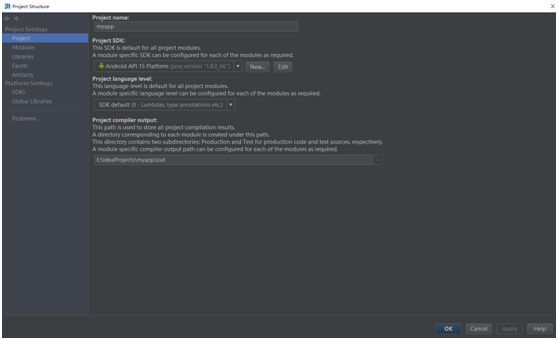
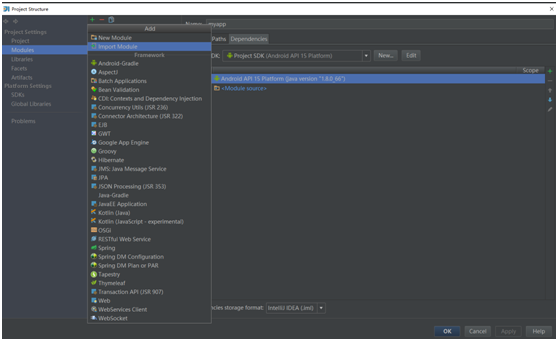
- 点击Modules,随后点击右侧左上方的“+”,在弹出栏中点击Import Modules,如下图:
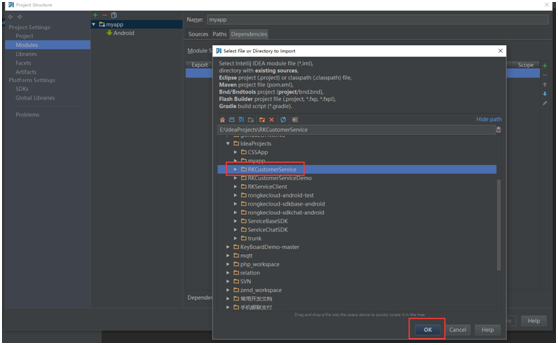
- 弹出选择项目界面,在此选择您的RKCustomerService所在目录,点击右下角OK,即可将此library导入到您的项目中;
- 将此library与您的项目连接起来:
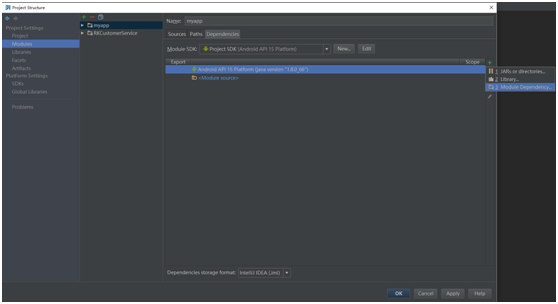
同样在Modules项,点击中间项您的app名称,再点击右侧“+”,选择第三项“Modules Dependency”,以myapp为例,如下图:
- 点击Modules Dependency后,弹出选择Modules界面,选择RKCustomerService,如下图:
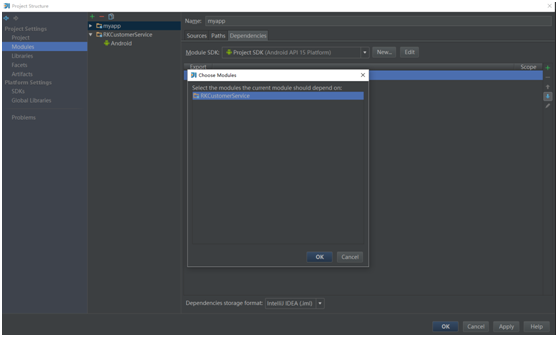
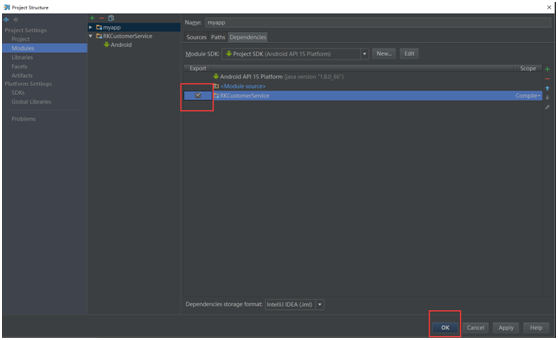
- 选择后RKCustomerService将显示在您的app下,选中RKCustomerService,点击右下角OK即可配置成功,如下图:


Eclipse集成方法
- 将library导入到您的eclipse中,点击左上角File→Import,弹出选择项目界面,如下图:
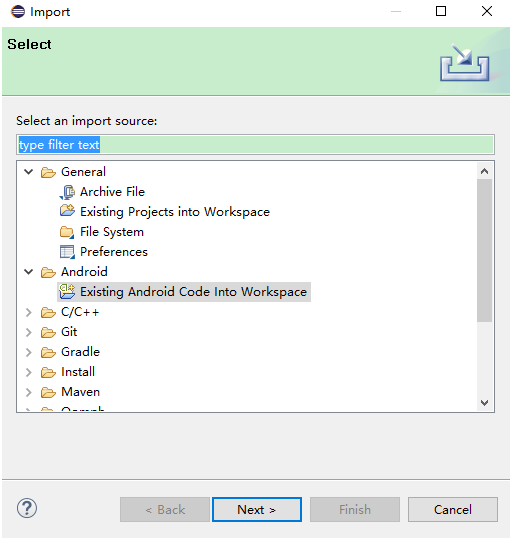
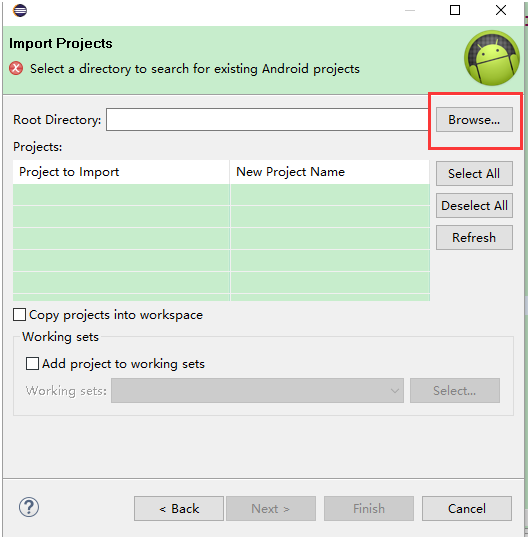
- 选择Android→Existing Android Code Info Workspace,点击“Next”按钮,弹出项目选择界面,点击“Browse”,选择RKCustomerService,加入到您的eclupse中,点击Next,如下图:
- 导入成功后,右键RKCustomerService,点击Properties,弹出如下对话框:
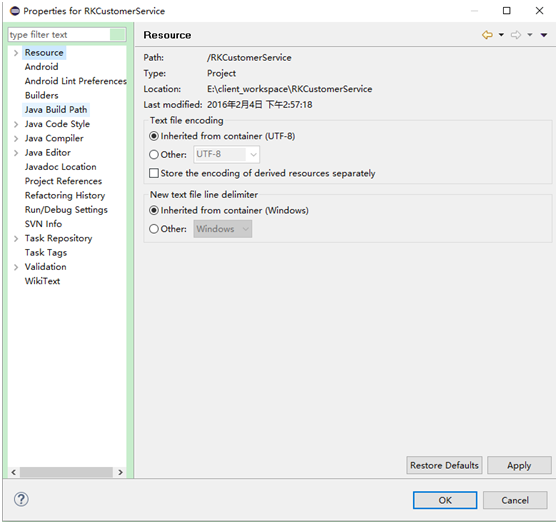
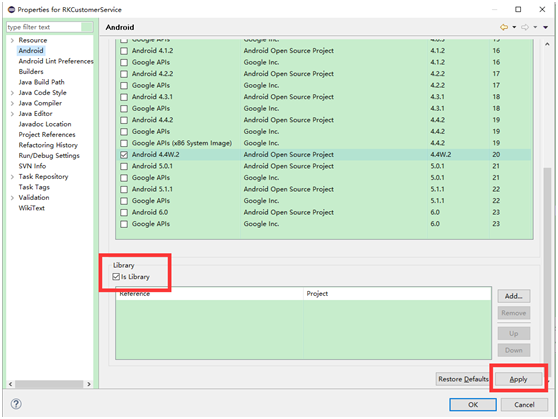
- 在此对话框中点击Android,在右侧勾选is library,点击Apply,如下图:
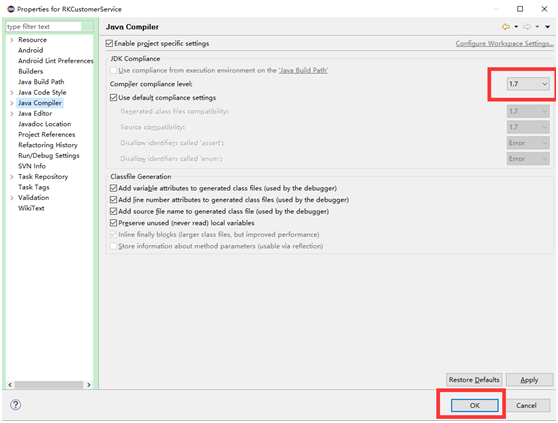
- 点击Java Compiler,选择JDK为1.7,点击OK,如下图:
- 将此library与您的app连接:右键您的项目,Build Path→Configure Build Path,弹出如下界面:
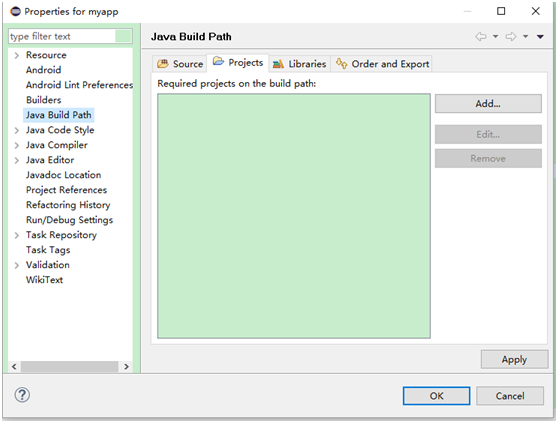
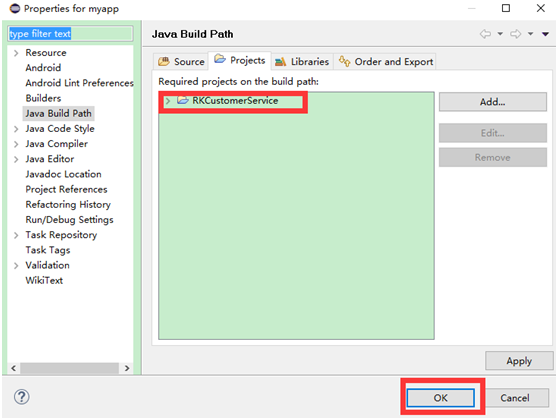
- 点击Java Build Path,在右侧点击Projects→Add,选择RKCustomerService,点击OK,即可配置成功,如下图:


SDK配置
- 配置权限到您的AndroidManifest.xml文件中
<uses-permission android:name=“android.permission.INTERNET”/>
<uses-permission android:name="android.permission.ACCESS_NETWORK_STATE"/>
<uses-permission android:name="android.permission.WRITE_EXTERNAL_STORAGE"/>
<uses-permission android:name="android.permission.WAKE_LOCK"/>
<uses-permission android:name="android.permission.RECORD_AUDIO"/>
<uses-permission android:name="android.permission.VIBRATE"/>
-配置Activity到您的AndroidManifest.xml中
<!-- 设置连接service页面-->
<activity               android:name="com.rongkecloud.customerservice.ui.RKServiceChatConnectActivity"
    android:screenOrientation="portrait"
    android:theme="@android:style/Theme.Translucent"/>
<!-- 设置聊天页面-->
<activity
      android:name="com.rongkecloud.customerservice.ui.RKServiceChatMsgActivity"
      android:launchMode="singleTask"
      android:screenOrientation="portrait"
      android:theme="@android:style/Theme.NoTitleBar"
      android:windowSoftInputMode="adjustResize"/>
<!-- 设置留言给客服页面-->
<activity    android:name="com.rongkecloud.customerservice.ui.RKServiceChatLeaveMessageActivity"
      android:screenOrientation="portrait"
      android:theme="@android:style/Theme.NoTitleBar"/>
<!-- 设置图片滑动页面-->
<activity    android:name="com.rongkecloud.customerservice.ui.RKServiceChatViewImagesActivity"
      android:screenOrientation="portrait"
      android:theme="@android:style/Theme.NoTitleBar"/>
-配置receive到您的AndroidManifest.xml中
<receiver
          android:name="com.rongkecloud.android.lps.RKServiceBroadcastReceiver"
          android:enabled="true"
          android:exported="false" >
<intent-filter android:priority="90000" >
<action android:name="android.intent.action.USER_PRESENT" />
</intent-filter>
<intent-filter>
<action android:name="android.net.conn.CONNECTIVITY_CHANGE" />
<action android:name="android.net.wifi.RSSI_CHANGED" />
<action android:name="android.net.wifi.STATE_CHANGE" />
<action android:name="android.net.wifi.WIFI_STATE_CHANGED" />
</intent-filter>
<intent-filter>
<action android:name="lps.message.receive" />
<action android:name="action_reconnect" />
<action android:name="action_ping" />
<data android:mimeType="*/*" />
</intent-filter>
</receiver>
-配置service到您的AndroidManifest.xml中
<service
          android:name="com.rongkecloud.android.lps.LPSDaemonService"
          android:exported="false"
android:process=":remote" />
使用SDK
在您的app中做一个触发“连接客服”的事件,在此事件中将您在管理平台生成的配置代码加进去,即可正常使用融智客服客户SDK。